
Modeling alternatives: a GenAnywhere review for early-stage teams
Four ways to get a site into 3D, and the questions that separate them before the design hardens.
Early-stage teams usually face four options: a hand-built blockout, a photogrammetric capture, a base generated from map data, or a BIM model authored from scratch. Each produces something different, and the right choice depends on the question rather than on the software. A short review keeps the comparison honest.

1 Frame the review
1.1 What question starts it?
Start with the decision the scene has to support. A massing test, a view study, a condition record and a coordination meeting each need a different level of detail.
Without that question, every option looks inadequate in one way and excessive in another. The review turns into a feature comparison rather than a choice about evidence. A question that cannot be stated in one sentence usually means the scene is being asked to serve two decisions at once. Splitting it is often the cheapest part of the review. Two decisions in one review usually produce a scene that serves neither well.

1.2 Who joins the review?
The person who will use the scene, the person who will pay for it and the person who will maintain it. Those are often three different people, and each cares about a different property.
A designer wants editability, a project lead wants a defensible record and an IT lead wants a file that opens. Naming those needs early prevents a decision that suits one reader and fails the rest. The review is short by design; a long comparison tends to favour the option with the most features rather than the one with the right evidence.
2 Compare the inputs
2.1 What does each option need?
A blockout needs a brief and a modeller. A capture needs a flight, access and processing. A map-derived base needs a drawn area. A BIM model needs a brief and a set of design decisions that may not exist yet.
The input is often the deciding factor. A team without a flight budget cannot choose a capture, and a team without a design cannot author a BIM model. Cost belongs in the input column, because a method that needs something the team cannot afford is not really an option.
2.2 Which input is missing?
List what the team already has before comparing outputs. A recent survey, a set of drawings or an existing model can change the answer completely.
Where an input is missing, ask whether it can be obtained in time for the decision. If it cannot, the option that depends on it is not really available. A survey that exists but cannot be shared is also missing, and the review should say so rather than assume it away. Ask who can share what before the comparison starts, because a permission discovered late can remove an option the team already chose.
3 Compare the outputs
3.1 What does each produce?
A blockout produces volumes with no provenance. A capture produces a textured mesh of surfaces. A map base produces an editable arrangement with layers. A BIM model produces authored elements and documentation.
Each output carries a different kind of confidence, and a review that treats them as equivalent will choose on appearance rather than on evidence. Appearance is the weakest basis for the choice, because every method can be made to look convincing in a still image.
3.2 Which output fits the decision?
A massing decision needs volumes that can move, which points to the blockout or the map base. A condition decision needs surfaces, which points to the capture.
A coordination decision needs authored elements, which points to BIM. Matching the output to the decision is faster than arguing about which tool is better. Write that match next to the option, so the reason survives the meeting. The label is the cheapest part of the comparison and the one most often skipped in a hurry. Open standards such as the OGC CityGML standard are useful when the options differ in how they name levels of detail.
4 Compare the edit
4.1 How hard is a change?
Changing a massing in a blockout is quick. Changing it in a capture means rebuilding the mesh, because the texture has no separate idea of a wall. Changing it in a map base means replacing or moving a block.
Changing it in a BIM model means editing elements that other people may already be coordinating. The cost of a change rises with the number of decisions already recorded. The number of people affected is a useful proxy, and it is easier to discuss than an abstract risk.
4.2 What survives a revision?
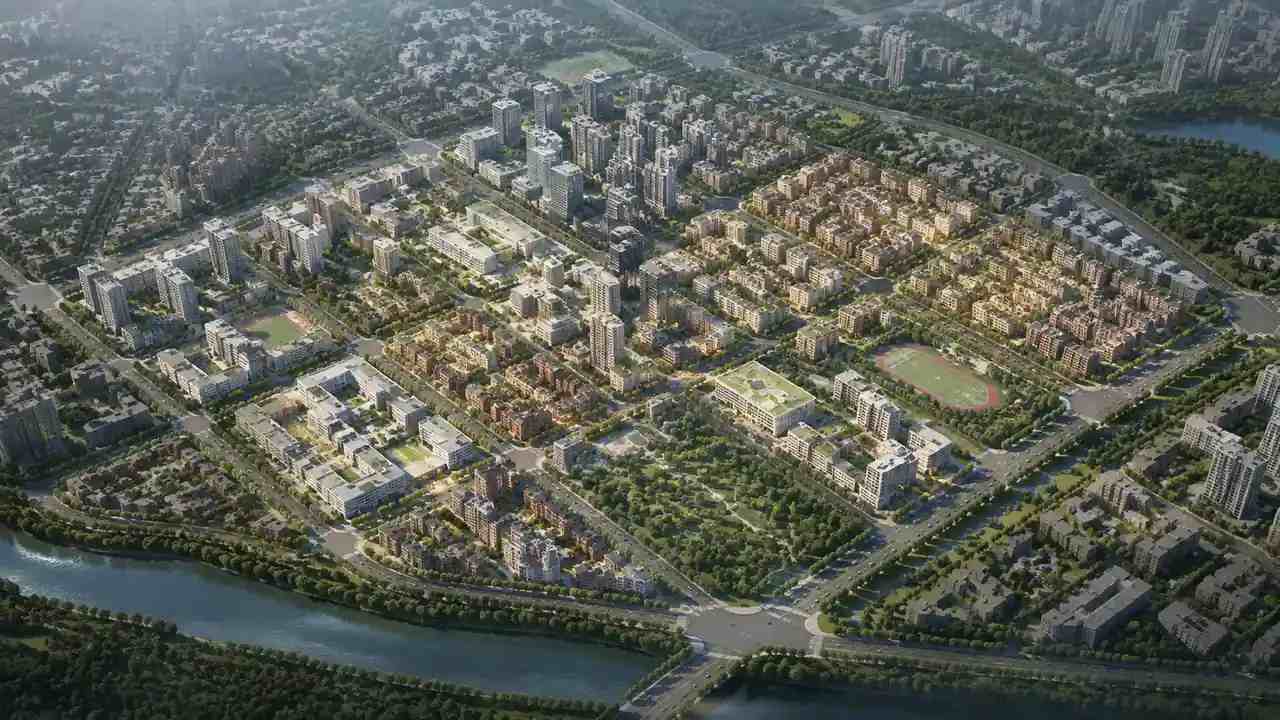
A map-derived base keeps its layers through an edit, so a reviewer can still hide the trees or isolate the ground. GenAnywhere lets a team replace a building, move a block or change a height without touching the rest of the scene.
A capture does not survive revision in the same way. Every new flight produces a new record, and the old one becomes history rather than a working file. A base that keeps its layers can be revised in front of a room, and the revision itself becomes the argument. The surviving record should be labelled with its date, so a later revision does not inherit the wrong scene.
5 Run the review
5.1 What do you show side by side?
Show the same site at the same scale, from the same viewpoint, with the same question attached. A comparison that changes the camera or the extent compares the presentation rather than the options. A fixed camera also protects the team from the accusation that the comparison was staged.
Label each option with its source and date. A reviewer who cannot tell which scene came from a flight and which from a map will draw the wrong conclusion.
5.2 What do you record?
Record the question, the options considered, the input each one needed and the reason for the choice. That record is more valuable than the winning scene, because it explains the decision to the next team. It should be short enough to read in a minute and specific enough to say why the other options lost.
Note the options rejected and why. A later reader may face the same question with a different budget, and the record saves them from starting over.
6 Decide
6.1 When does the map base win?
When the question is about arrangement, the site is large or the design is still open. The base gives an editable scene without waiting for a brief or a flight.
It also wins when the team needs context beyond the site. A drawn area can cover the next street and the riverbank, which a single capture rarely does. The base also wins when the team needs to compare two sites, because the same method applies to both.
6.2 When does another option win?
When the decision depends on a surface, the capture wins. When it depends on authored elements, BIM wins. When it depends on a quick volume study with no data, a blockout wins.
The point of the review is not to crown one method. It is to match the evidence to the question and to say why. A hybrid answer is common, and it is acceptable as long as each source keeps its label.
6.3 When do you revisit?
Revisit when the question changes, the budget changes or the site changes. A choice that suited a feasibility stage may not suit a planning submission.
Keep the review note with the scene. A short paragraph explaining the choice is enough for the next team to decide whether it still holds. Revisit at each stage gate rather than on a calendar, because the question changes with the stage. A review note that says which stage it belonged to is easier to revisit than a folder of scenes without a date.
Draw the area in the GenAnywhere app and compare it with the other options on the same site and viewpoint.
7 FAQ
FAQ-1 Is this review about software alone?
No. It is about the evidence each method produces and the cost of changing it. Software matters, but the decision usually turns on the question, the available input and the kind of confidence the team needs. Two teams using the same software can still need different methods. The software follows from the evidence, not the other way round.
FAQ-2 Can several options be combined?
Yes, and they often are. A map base can carry the arrangement while a capture supplies surface evidence and a BIM model carries the design. The combination works when each source stays labelled and the note says which one governs which question. The risk is losing track of which file answered which question, not the combination itself.
FAQ-3 How many options should a review include?
Three or four is usually enough to expose the trade-offs without turning the review into a procurement exercise. Include the option the team already uses, because it is the baseline every other choice will be judged against. More options add cost to the review without necessarily improving the decision itself.
FAQ-4 What if the team disagrees?
Return to the question. A disagreement about tools is often a disagreement about what the scene is for. Once the decision is stated in one sentence, the options that cannot support it drop away, and the remaining choice is easier to make. Write the agreed question at the top of the note, so the next disagreement has somewhere to start.
See how a map area becomes an editable site model in the GenAnywhere workflow.
Content and technical notes
This article was prepared by the GenAnywhere team with AI-assisted drafting and human review.
Product features, formats, and availability change as the platform evolves; refer to the official GenAnywhere website for current details.
For technical questions or corrections, contact support@genanywhere.com.
Last reviewed: 2026-11-06.